Stovita Sign up free

How to rent out your holiday apartment with Stovita

You paste the link to your listing and connect your calendars. Stovita turns it into your website and works out the final price with tourist tax. Guests pay you directly.

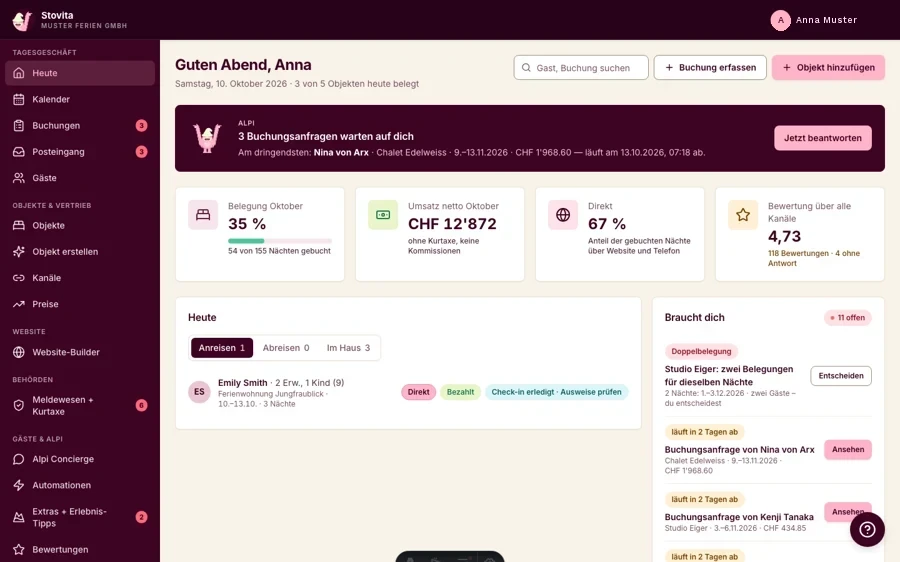
Stovita’s daily overview: open booking enquiries, occupancy, revenue and what needs you today
Sample data

This is your day in Stovita: enquiries, arrivals and today’s tasks, on one page.

Online in 3 steps

Already have a listing? Just bring the link. Otherwise, you enter everything by hand.

  1. Paste your listing link

    Stovita imports photos (up to 20), title, description, amenities and address from Airbnb, Expedia or your website. Anything uncertain is flagged for you to check.

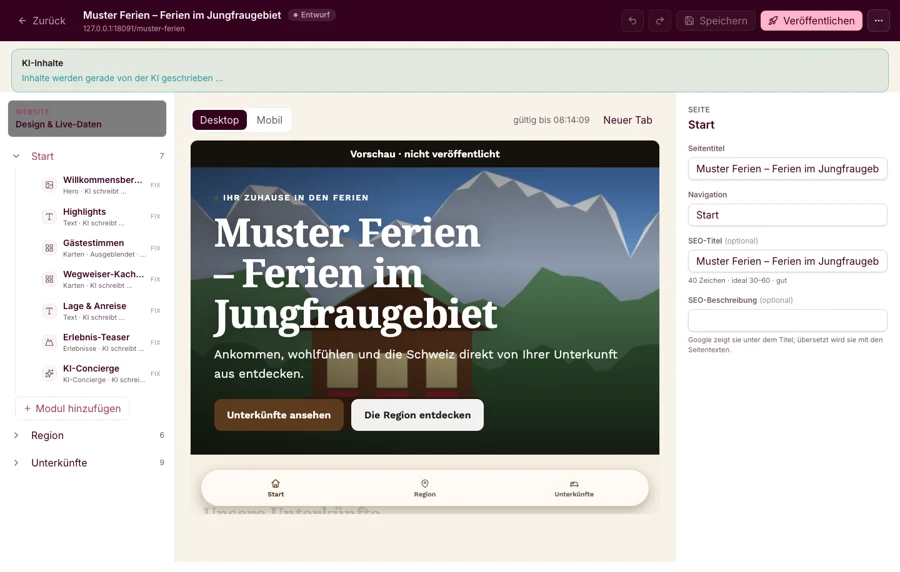
    Stovita writes the home page of your website from the listing
    Sample data
  2. Connect your calendars

    You copy the calendar link (iCal) from Airbnb, Booking.com or Vrbo into Stovita, and the Stovita link back. From then on, every booking blocks the nights everywhere.

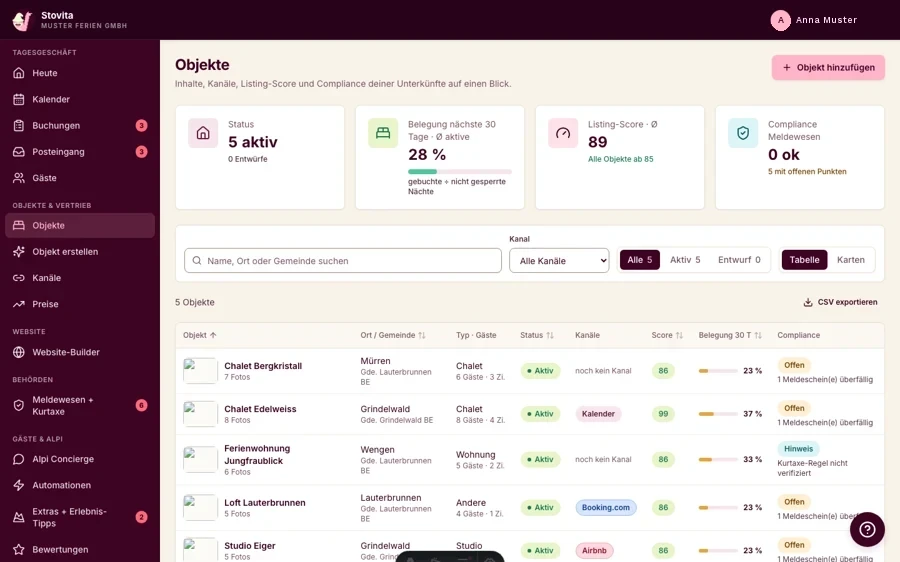
    List of properties, each with its connected channels Airbnb, Booking.com and calendar
    Sample data
  3. Confirm enquiries

    Guests send an enquiry on your website and see the final price with cleaning and tourist tax. You confirm, and the QR-bill goes out.

    Booking enquiries waiting for your reply
    Sample data

Six areas, one account

Everything you need to rent out, in one place.

Your own booking website

Your holiday apartment gets its own website. Guests see photos and the exact final price and send their enquiry straight to you.

  • In German, French, Italian and English
  • On your own domain or at stays.swissactivities.com/your-name
  • Imprint from your details, statistics without cookies
One calendar for all platforms

Calendar sync (channel manager)

Airbnb, Booking.com, Vrbo and e-domizil connect to your Stovita calendar by calendar link (iCal). A booking blocks the nights everywhere.

  • Both ways, for every platform with a calendar link
  • If there is a conflict, you get an email
  • A calendar that suddenly turns empty is paused, not released
Calendar sync explained

Enquiries and invoices

Guests send an enquiry and see the exact final price. You confirm, and the QR-bill goes out.

  • Final price with accommodation, cleaning, extras and tourist tax
  • Guests pay you directly by bank transfer, TWINT or cash
  • Deposit, balance and payment reminders

Tourist tax and guest registration

Stovita knows your municipality’s rule and adds the tourist tax to the price. Guests fill in the registration online.

  • All 2'110 municipalities known, rates stored for over 200
  • Registration without an ID photo, with reminders and an archive
  • Nights counted across all channels, for limits such as 90 nights
Tourist tax by municipality

Guest info on their phone

Guest app in the browser

Your guests get check-in, Wi-Fi and directions in their browser. They download nothing.

  • Online check-in before arrival
  • Book extras
  • Alpi answers questions as an AI concierge

Cleaning schedule and team

Stovita plans every cleaning from the bookings. Your team sees its tasks, without a password.

  • Cleaning schedule for your cleaning team, no password
  • Damage reports with photos
  • Owner statements and reports
Stovita for rental agencies

Your guests ask, Alpi answers

Alpi is the AI concierge in the guest info. Your guests ask him whatever they want to know.

  • Knows the property, region, weather and timetable
  • Says openly that he can be wrong
  • Anything binding, like prices or changes, you handle yourself
  • In an emergency, he shows the emergency numbers
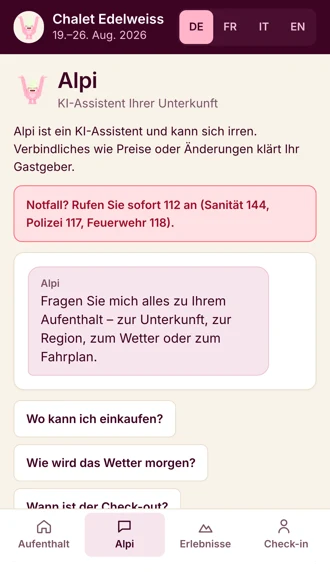
Alpi in the guest info: emergency numbers and sample questions like “Where can I go shopping?”
Sample data

Alpi · AI

I answer your guests’ questions. About the property, the region and the timetable.

Alpi, the concierge for your guests, points at the phone

Questions about the process

What it costs is on the Pricing page.

I already have a listing. Do I need to enter everything again?

No. After signing up, paste the link to your listing. Stovita imports the photos, text, amenities and address. Anything uncertain is flagged for you to check.

I don’t have a listing yet. Does it still work?

Yes. Without a link, you enter photos, text and amenities by hand.

How do I connect Airbnb, Booking.com and Vrbo?

By calendar link (iCal). You copy the platform’s link into Stovita and the Stovita link back into the platform. A new booking blocks the nights everywhere.

What happens with a double booking?

A new booking blocks the nights in all connected calendars. If there is still a conflict, you get an email. A calendar that suddenly turns empty is paused instead of released.

Do my guests need an app?

No. The guest info runs in the browser. Your guests download nothing.

Try it with your apartment. It costs nothing.

Sign up and paste the link to your listing. Anything uncertain is flagged for you to check.

Sign up free

Questions? Write to hallo@stovita.com

View over turquoise Lake Brienz